 LUANCO AUDIO
Luanco Chorus · complete manual
Luanco Chorus 2.0 manual
Supported systems: macOS 15 or later on Apple Silicon, iPadOS 26.2 or later (iPad only). A compatible AUv3 Music Effects host application (software) with audio input routing is required. No external hardware or pairing is required. The container app does not process audio on its own.
Luanco Chorus is an AUv3 audio effect for compatible iPad and Mac hosts. It divides incoming stereo audio into up to four bands. Each band selects Chorus, direct Texture or Texture → Chorus, with independent motion, playback, interaction and MIDI controls. This manual describes the upcoming 2.0 release, which supersedes the unreleased 1.8 build. Final build validation and release availability remain pending. This manual describes the independent Chorus AU. Where Workhorse offers extra routing, it is marked Workhorse only.
Screenshots show the earlier 7 October 2026 native Mac preview, with capture and binary provenance. Final release screenshots and physical-iPad host evidence are pending.
All defaults below are the initial AU parameter values, before a factory preset or host project changes them. Most percentages represent internal 0–1 values; Velocity, Aftertouch and Envelope Amount are bipolar −1 to +1. Speed is a scalar multiplier, not a percentage. A hidden control keeps its value; automation or modulation may still make that value audible.
Getting started
- Install the separate iPad or Mac app and open its container once if your system needs to register the AUv3 extension.
- Load Luanco: Chorus in a compatible AUv3 Music Effects host and route audio into it. Host names and slots vary; if the host lists Music Effects as MIDI-controlled effects, use that slot and its audio routing. The host supplies the audio; the container app is not a standalone audio processor.
- Play the track and adjust the independent global Dry and Wet levels if needed. Start with the Subtle Width factory preset for a restrained comparison.
- Use the host's plug-in bypass to compare with the original at matched listening level. Save the host project to recall parameters and automation.
The native iPad and Mac apps are separate purchases. Host menus and sidechain routing differ by host. If the AU is absent, restart the host after installation, confirm its AUv3 Music Effects support, and check that the correct platform app is installed.
Workspace and signal flow
The same workspace is used by the independent Mac and iPad AU editors and by Workhorse attached or floating editors. The left strip contains the product icon, whole-insert Off/On, Settings and quality. The central area places presets above the spectrum, frequency-band tabs below it, then the selected band's Activity plot. The right rail keeps Dry/Wet, MIDI Channel, global Tone and concise section summaries available. Click a section to open its parameter popover; the rail, rather than a sticky Sections menu, is the navigation.
Processing, Chorus, Texture, Motion, Rhythm, Dynamics, Feedback, Freeze, Interaction, MIDI Expression and Spectral operate on the selected band. Tone affects the combined wet output; crossovers appear when multiple bands are active. Opening Motion, Texture, Dynamics, Freeze, Interaction or Spectral selects the matching Activity view. Tone EQ and the editable Rhythm Curve belong to their rail popovers. Child controls hide when the selected path or enable state makes them inapplicable, while their values remain saved. Off/On and information actions remain available for disabled sections.
The signal path is input → band split → selected path (Chorus, Texture or Texture → Chorus) with its feedback/interaction → per-band Spectral → Band Mix → recombination → global wet Tone → independent Dry + Wet levels. Dry preserves the original full-range input. Band Mix blends each band's unprocessed input into its processed return and is separate from global Wet. Interaction Capture Blend can replace newly recorded texture input; Dynamics Sidechain Source only controls the detector.
Whole-insert Off/On uses the independent AU bypass or Workhorse FX-chain bypass and is distinct from the saved Chorus Active parameter and per-band Enabled. A single active band stays Enabled; add another band before bypassing one band independently. Switching Off retains settings. Both global levels at zero silence output after smoothing; when Wet is zero, processing can stop after transitions and tails while source history remains ready for capture.
Bands and spectrum
The spectrum shows input and combined wet audio in Hz/dBFS, with colored frequency regions and draggable crossover boundaries. Band tabs sit directly below it. The Activity plot beneath the tabs follows the selected band, using the shared Activity mode selector. Analysis history is sampled at 20 Hz and pauses when the editor or plots are hidden.
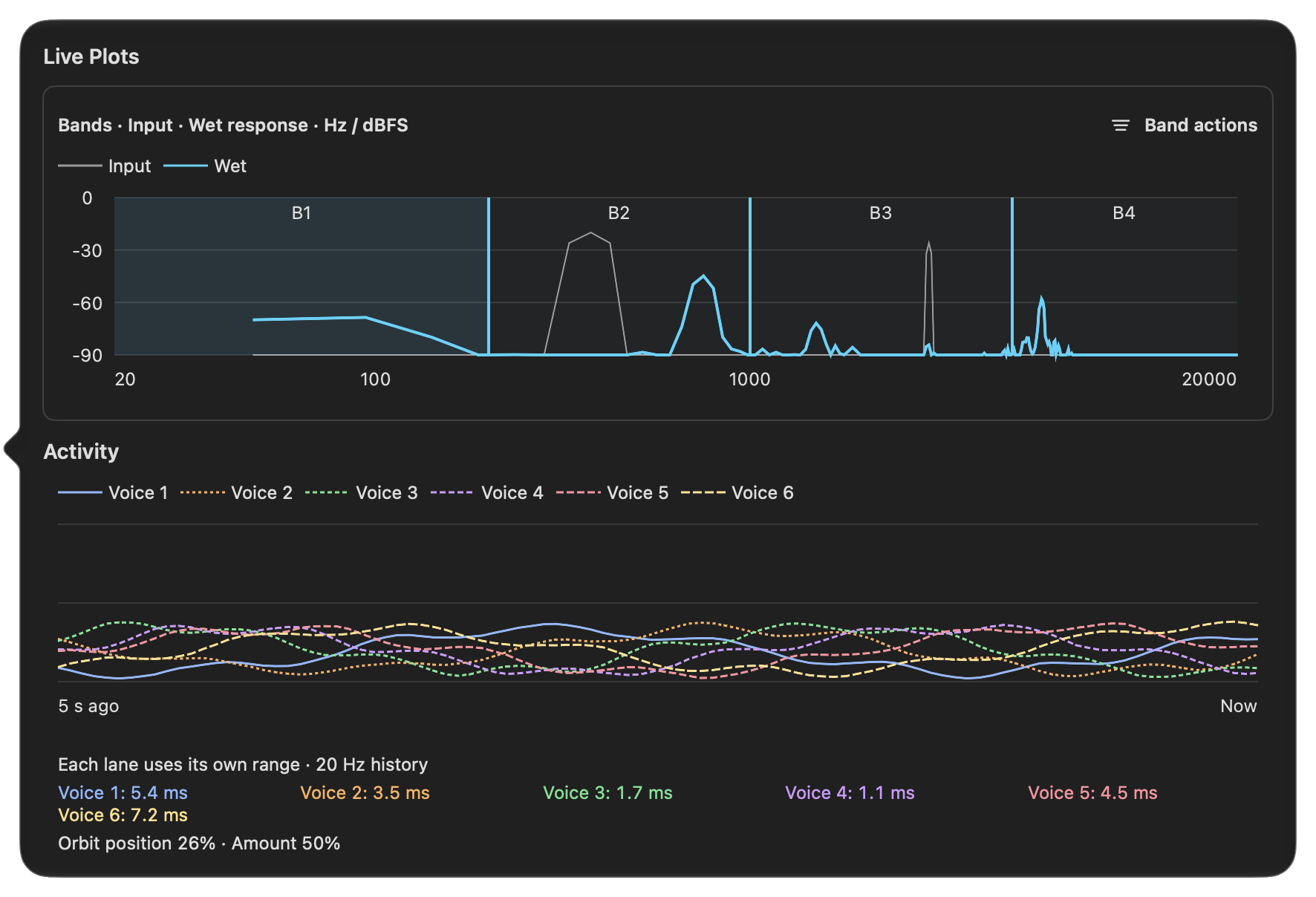
Select a band by its tab or by tapping its spectrum region. The Audition Off/On control plays that band's input before chorus, so you can locate the material around a crossover. Audition is temporary, ends on band or structure changes, and is not a preset setting. Drag a crossover handle or use its dial. The band menu offers Split Band and Join into adjacent Band. Splitting copies the source band's settings and rhythm curve into the new slot but leaves manual Freeze capture Off; joining preserves the chosen destination band's identity and curve. A maximum of four bands is available.
Crossover Slope offers 12, 24, or 48 dB/octave, initially 24 dB/octave. Crossover 1–3 accept 20–20,000 Hz and initially hold 200, 1,000, and 5,000 Hz; only boundaries between active bands appear. The editor orders them, keeps at least 1 Hz between adjacent boundaries, and limits the top to the current sample rate's usable range. Band 1–4 Position is the stored topology: 0 means inactive, 1–4 is frequency order. Initially Band 1 is position 1 and the others are inactive. The split/join controls manage this order; ordinary editing does not require changing it directly.
Global Dry/Wet and setup
Dry and Wet each span 0–100%, initially 50%. Their gains are independent and can sum above unity. Band Mix remains a separate blend inside the processed return. The old global Wet automation address now displays Wet. Presets without Dry derive it as 100% minus their old Mix; an explicitly saved Dry wins. This conversion does not promise identical multiband or Ultra audio to older routing.
Scroll table horizontally →
| Parameter | Purpose | Range; initial | Dependency and example |
|---|---|---|---|
| Dry | Sets original full-range input level independently of Wet. | 0–100%; 50% | Start with Dry 50% and Wet 50%; both can sum above unity. |
| Wet | Sets the combined processed band return independently of Dry. | 0–100%; 50% | For wet-only listening set Dry 0%, Wet 100% and active Band Mix 100%. |
| Chorus Active | Saved processing enable; distinct from host/insert bypass. | Off/On; On | Initially On in the independent AU; Workhorse empty insert rows initialize Off. |
| Quality | Chooses lighter processing or smoother moving-delay interpolation. | Eco/Ultra; Eco | Eco or Ultra is shared by the instance and sits in workspace chrome. |
| MIDI Channel | Filters incoming channel notes and pressure for every band. | All/1–16; All | Clock has no MIDI channel; changing the channel clears held notes and captures. |
| Crossover Slope | Sets band crossover steepness. | 12/24/48 dB/octave; 24 dB/octave | Visible for multiple active bands; 24 dB/octave is the initial setting. |
| Crossover 1 | Sets a boundary between adjacent active frequency bands. | 20–20,000 Hz; 200 Hz | Crossovers are ordered with at least 1 Hz separation and limited by the sample rate. |
| Crossover 2 | Sets a boundary between adjacent active frequency bands. | 20–20,000 Hz; 1,000 Hz | Crossovers are ordered with at least 1 Hz separation and limited by the sample rate. |
| Crossover 3 | Sets a boundary between adjacent active frequency bands. | 20–20,000 Hz; 5,000 Hz | Crossovers are ordered with at least 1 Hz separation and limited by the sample rate. |
| Band 1 Position | Stores inactive (0) or frequency-order (1–4) topology. | 0–4 positions; 1 | Use Split/Join and band tabs; ordinary editing does not require changing position directly. |
| Band 2 Position | Stores inactive (0) or frequency-order (1–4) topology. | 0–4 positions; 0 | Use Split/Join and band tabs; ordinary editing does not require changing position directly. |
| Band 3 Position | Stores inactive (0) or frequency-order (1–4) topology. | 0–4 positions; 0 | Use Split/Join and band tabs; ordinary editing does not require changing position directly. |
| Band 4 Position | Stores inactive (0) or frequency-order (1–4) topology. | 0–4 positions; 0 | Use Split/Join and band tabs; ordinary editing does not require changing position directly. |
Chorus controls
The inventory contains 79 per-band controls, 3 global Tone controls and 13 other global controls. Each band has 24 voice/dynamics/feedback, 30 motion/texture/interaction and 25 MIDI fields. Rate, Depth, and Width for Band 1 retain their original global AU addresses for project and automation compatibility; in the editor they control Band 1. Processing dependencies explain when a control can be heard or shown. The examples are starting points, not prescribed settings.
Scroll table horizontally →
| Parameter | Purpose | Range; initial | Dependency and example |
|---|---|---|---|
| Enabled | Bypasses this band's chorus while retaining settings. | Off/On; On | Only applies to an active band; use Off on a low band when another band is active to keep bass dry. |
| Rate | Sets ordinary voice-delay modulation and Barberpole sweep speed. | 0.05–8 Hz; 0.35 Hz | Needs audible Depth or Barberpole motion; try 0.15 Hz for slow strings. |
| Depth | Sets ordinary delay sweep range; also shapes Spectral movement. | 0–100%; 25% | At 0%, ordinary pitch movement stops; try 50% for obvious movement. |
| Width | Blends wet left and right channels toward a wider stereo result. | 0–100%; 50% | Needs a wet signal; compare 100% with a mono check. |
| Band Mix | Blends this band's unprocessed input and selected processed path before global Wet. | 0–100%; 100% | 0% keeps the band dry; try 0% in the lowest band. |
| Base Delay | Centers each voice's delay. | 0.1–50 ms; 4 ms | Needs a wet voice; try 25 ms for a more separate doubling effect. |
| Voices | Chooses normalized delayed stereo copies. | 1–6 voices; 1 | More voices make an ensemble; try four on strings. |
| Voice Spread | Distributes voice positions across stereo. | 0–100%; 0% | Shown with more than one voice; try four voices at 70%. |
Motion
Scroll table horizontally →
| Parameter | Purpose | Range; initial | Dependency and example |
|---|---|---|---|
| Ensemble | Adds faster, shallower motion to the main modulation. | 0–100%; 0% | Needs a wet voice; try 60% with slow Rate. |
| Drift | Varies each voice's speed and delay independently. | 0–100%; 0% | Needs a wet voice; try 20% for imperfect-performer movement. |
| Swarm Coupling | Couples each voice's modulation to its neighbor. | 0–100%; 0% | Shown with two or more voices; try 50% with Drift at 20%. |
| Barberpole | Continuously sweeps delay heads upward or downward. | Off/Rise/Fall; Off | Rate sets speed and Depth sets range; try Rise with four voices. |
| Orbit Amount | Moves voices around the stereo field instead of fixed pan positions. | 0–100%; 0% | Needs wet output; try 75% with four voices and wide Width. |
| Orbit Speed | Sets Orbit rotation independently of Rate. | 0.05–8 Hz; 0.35 Hz | Only audible above 0% Orbit Amount; try 0.35 Hz at 75% amount. |
Freeze and fragments
Freeze captures up to 4,000 ms of recent band input and repeats it through the selected path. Set Keep/Add and Capture Length before manual capture or a MIDI note. Length changes affect the next capture, without resizing a held loop. Keep admits no fresh audio. Add permanently overdubs the selected Capture Blend and feedback at a controlled level. With existing history, capture uses valid recorded audio up to Capture Length. If Freeze begins before any history exists, live playback continues until the selected length has been recorded.
Reverse is the probability that each newly launched fragment reverses its direction: 0% follows Speed; 100% reverses every fragment. Scatter changes starts across the four-second source history. Grain Length spans 5–1,000 ms but available history and playback speed can shorten it. Two overlapping heads share stereo positions. Live playback crossfades back into valid recorded audio at boundaries; frozen playback wraps through the held capture.
Freeze audio is temporary and is never stored in presets or projects. Manual Freeze reloads Off; a MIDI Freeze trigger can reload armed and capture when its selected note arrives. Releasing the capture returns to live audio. Input silence can produce a silent capture; stopped Tape at Speed zero also fades to silence.
Scroll table horizontally →
| Parameter | Purpose | Range; initial | Dependency and example |
|---|---|---|---|
| Freeze | Captures and repeats recent band input. | Off/On; Off | Turn On while audio plays; Freeze Ready prepares a 500 ms capture; the full range extends to 4,000 ms. |
| Freeze Behaviour | Choose held capture or permanent overdub. | Keep/Add; Keep | Set while Freeze is Off; try Add over a short chord. |
| Capture Length | Sets length of the next held loop. | 20–4,000 ms; 4,000 ms | Set before capture; try 80 ms for rhythmic repetition. |
| Reverse | Sets the reverse-direction probability for newly launched fragments. | 0–100%; 0% | Requires Texture or Texture → Chorus; negative Speed already plays backward. |
| Scatter | Jumps between distant positions within source history. | 0–100%; 0% | Requires Texture or Texture → Chorus; combine with Repeat for stuck fragments. |
| Grain Length | Sets requested Reverse/Scatter fragment duration independently of Freeze Capture Length. | 5–1,000 ms; 150 ms | Requires a texture path; try 15 ms for rough grains or 1,000 ms for retained phrases. |
Processing paths and texture playback
Chorus uses the moving voice bank without texture playback. Texture plays two overlapping stereo fragments directly, skipping chorus voices, Barberpole taps and the separate feedback pitch shifter. Texture → Chorus feeds fragments into the voice bank. All paths can use per-band Spectral and the global wet Tone. Chorus-only controls hide in direct Texture.
Tape changes pitch with Speed; Preserve Pitch moves grain starts at that speed while each grain retains independently chosen Grain Pitch. Negative Speed moves backward. At zero, Tape fades to silence and Preserve Pitch repeats a stationary texture. Very short Preserve Pitch grains introduce granular coloration. Repeat and Random Seed affect newly launched fragments without overwriting captured audio.
Scroll table horizontally →
| Parameter | Purpose | Range; initial | Dependency and example |
|---|---|---|---|
| Processing Path | Selects one of three per-band signal paths. | Chorus/Texture/Texture → Chorus; Chorus | Chorus uses voices; Texture skips voices; Texture → Chorus runs both stages. |
| Playback | Chooses speed-linked tape pitch or independent granular pitch. | Tape/Preserve Pitch; Tape | Texture path required. Tape at zero fades silent; Preserve Pitch holds stationary grains. |
| Speed | Moves through history with a signed scalar multiplier. | −4 to +4×; +1× | Texture path required. Negative reverses movement; +1× is normal speed; zero stops movement. |
| Grain Pitch | Tunes grains independently from history movement. | −24 to +24 semitones; +0 | Texture path required. Preserve Pitch at Speed zero and +24 semitones gives stationary high grains. |
| Repeat | Sets probability of relaunching the previous fragment. | 0–100%; 0% | Requires a texture path; combine 90% Repeat with Scatter for repeated cuts then new jumps. |
| Random Seed | Chooses deterministic fragment randomness saved in presets. | 1–16,777,215 integers; 3,510,727 | Same seed and matching render conditions reproduce choices; different history or triggers change output. |
Fragment timing
Free launches continuously at Grain Length. Host retriggers at the selected beat division using host tempo and beat position, including triplets. Source Transient retriggers from attacks in Interaction Source; Sensitivity and Minimum Retrigger prevent densely spaced attacks from relaunching constantly. Fragment timing and the Rhythm curve have independent clocks and divisions.
Scroll table horizontally →
| Parameter | Purpose | Range; initial | Dependency and example |
|---|---|---|---|
| Grain Timing | Chooses continuous, host-clocked or source-attack launches. | Free/Host/Source Transient; Free | Host needs beat position and tempo; Source Transient listens to Interaction Source. |
| Grain Division | Sets host beat interval for fragment retriggering. | 1/4/1/8/1/16/1/32/1/8T/1/16T/1/32T; 1/16 | Requires Host timing; T indicates a triplet. This is separate from Rhythm grid Division. |
| Transient Sensitivity | Sets how readily source attacks retrigger fragments. | 0–100%; 50% | Requires Source Transient; higher values respond to smaller attacks. |
| Minimum Retrigger | Limits repeated launches from closely spaced attacks. | 5–1,000 ms; 50 ms | Requires Source Transient; increase it to let fragments settle. |
Interaction
Choose Main Input, an active Chorus band or Host Sidechain in the independent AU. Workhorse also offers available Layer 1–15. This source is independent of Dynamics Sidechain Source. Capture Blend feeds newly recorded history; envelope motion needs a texture path; Ring Modulation changes the wet signal; Cross Feedback mixes the partner into the return before one bounded local Feedback gain. Spectral stays outside the feedback loop. Missing sources contribute silence, so route audio explicitly before increasing Capture Blend or Ring.
Scroll table horizontally →
| Parameter | Purpose | Range; initial | Dependency and example |
|---|---|---|---|
| Interaction Source | Selects audio used for capture, envelope, ring and partner feedback. | Main Input/Band 1–4/Host Sidechain; Main Input. Workhorse: also Layer 1–15. | Independent from Dynamics source; unavailable sources contribute silence. |
| Capture Blend | Blends the interaction source into newly recorded texture history. | 0–100%; 0% | 0% records local band input; 100% records the source. Freeze Keep admits no new input. |
| Envelope Target | Selects which texture parameter follows source level. | Speed/Scatter/Grain Size; Speed | Texture or Texture → Chorus required; saved values are retained. |
| Envelope Amount | Sets source-envelope direction and modulation strength. | −100–100%; 0% | Texture path required; negative values decrease Speed, Scatter or Grain Size. |
| Envelope Attack | Smooths rises in source level before modulation. | 0–500 ms; 10 ms | Short values follow attacks; long values rise gradually. |
| Envelope Release | Smooths source-envelope decay. | 0–2,000 ms; 100 ms | Longer values continue movement after the source becomes quiet. |
| Ring Modulation | Blends multiplication by interaction audio into the wet return. | 0–100%; 0% | Creates metallic sidebands; a silent source silences the ring-modulated portion. |
| Cross Feedback | Blends partner audio into the return before the bounded Feedback gain. | 0–100%; 0% | Feedback must be above zero; band partners use the previous sample to avoid processing-order loops. |
Spectral
Spectral adds moving frequency notches and frequency-dependent detuning after the selected wet path and before global wet Tone. Amount blends the transformation; Depth controls its strength, and Speed moves the notches and detuned regions. Higher Amount and Depth produce stronger changes in tone and tuning. It adds approximately 21–23 ms of wet-path latency while enabled, including when Spectral Amount is 0%. The dry path stays immediate; Eco and Ultra use the same Spectral timing. If phase or transient alignment matters, compare with Spectral Off, not merely Amount at zero.
Scroll table horizontally →
| Parameter | Purpose | Range; initial | Dependency and example |
|---|---|---|---|
| Spectral | Enables transform-based wet spectral processing. | Off/On; Off | On adds wet latency even at zero amount; try On for sustained pads. |
| Spectral Amount | Blends moving notches and detuning into the selected wet path. | 0–100%; 50% | Requires Spectral On; try 100% with Depth at 80% for a pronounced texture. |
| Spectral Speed | Sets spectral movement speed independently of Rate and Orbit. | 0.05–8 Hz; 0.35 Hz | Requires Spectral On and audible Amount/Depth; try 0.35 Hz. |
Dynamics and sidechain
Dynamics is Off, Gate, or Duck. Gate opens the selected target when the detector is above Threshold; Duck reduces it while the detector is loud. Target can be Depth, Mix, or Both. Sidechain Source chooses what controls the detector; it does not replace the audio being chorused. Input listens to the effect input. Host Sidechain requires a host route. Workhorse only: Layer 1–15 can trigger dynamics from another available layer before that layer's effects. Follow Band filters the chosen detector to the selected band's frequency range; Full uses its complete range.
Dynamics-dependent controls appear only when Mode is Gate or Duck. Their stored values remain available to automation and return when the mode changes.
Scroll table horizontally →
| Parameter | Purpose | Range; initial | Dependency and example |
|---|---|---|---|
| Dynamics | Chooses level-responsive motion. | Off/Gate/Duck; Off | Try Duck with Target Mix to preserve attacks. |
| Sidechain Source | Selects detector audio. | Input/Host Sidechain; Input. Workhorse: also Layer 1–15. | Needs Gate or Duck; route a host sidechain for rhythmic ducking. |
| Detector Band | Chooses full detector or frequencies within this band. | Full/Follow Band; Full | Needs Gate or Duck; follow a high band so bass hits do not trigger it. |
| Target | Scales modulation Depth, wet Mix, or both. | Depth/Mix/Both; Mix | Needs Gate or Duck; Mix ducks the audible wet blend. |
| Threshold | Sets detector trigger level. | −60–0 dB; −36 dB | Needs Gate or Duck; raise toward −24 dB for stronger triggers. |
| Amount | Sets maximum dynamics attenuation. | 0–100%; 100% | Needs Gate or Duck; try 50% for subtler movement. |
| Attack | Sets how quickly Gate opens or Duck attenuates after a trigger. | 0–200 ms; 0 ms | Needs Gate or Duck; try 5 ms on sharp attacks. |
| Hold | Keeps the response before release. | 20–800 ms; 240 ms | Needs Gate or Duck; try 80 ms for short notes. |
| Release | Sets return time after the hold. | 5–400 ms; 50 ms | Needs Gate or Duck; try 250 ms for a slow bloom. |
Feedback and tone
Feedback returns wet audio through the selected path. Direct Texture skips the separate feedback pitch shifter; use Grain Pitch to tune its fragments. Chorus and Texture → Chorus can use Feedback Pitch and Shifted Return. Feedback Pitch and Shifted Return affect the returned signal, not the initial dry input. Shifted audio may leave the original band's frequency region. The feedback controls are hidden when Feedback is zero and has no active modulation target; Pitch is hidden when Shifted Return is likewise inactive. Automation or modulation can make a hidden stored value relevant again.
Scroll table horizontally →
| Parameter | Purpose | Range; initial | Dependency and example |
|---|---|---|---|
| Feedback | Returns wet audio for repeated passes. | 0–95%; 0% | Try 30% for a restrained tail. |
| Feedback Pitch | Transposes each shifted feedback pass. | −12 to +24 semitones; +12 | Requires Feedback and Shifted Return above zero; try +12 for rising octaves. |
| Shifted Return | Blends ordinary and pitch-shifted feedback. | 0–100%; 0% | Requires Feedback above zero; try 50% at +12 semitones. |
| Feedback Tone | Low-pass filters recirculating audio. | 500–20,000 Hz; 20,000 Hz | Requires Feedback above zero; try 3,000 Hz to soften repeated highs. |
Global wet Tone
Low Cut, High Cut and Cut Slope operate once on the recombined wet return, across all bands. They never filter global Dry. Their global EQ response is edited in the Tone right-rail popover.
Scroll table horizontally →
| Parameter | Purpose | Range; initial | Dependency and example |
|---|---|---|---|
| Low Cut | Removes lows from all bands' combined wet output; Dry stays unchanged. | 20–2,000 Hz; 20 Hz | 20 Hz leaves the cut open; try 200 Hz on full-range input. |
| High Cut | Removes highs from all bands' combined wet output; Dry stays unchanged. | 500–20,000 Hz; 20,000 Hz | 20 kHz leaves it open; try 5 kHz for a soft ensemble. |
| Cut Slope | Sets the wet low/high cut steepness. | 12/24/36/48 dB/octave; 12 dB/octave | Use 24 dB/octave when isolating wet bass or treble. |
MIDI performance
Route MIDI to the Chorus effect in a compatible host. MIDI Channel applies to the whole Chorus instance: All accepts channels 1–16, or select one channel. Changing it clears held-note and pressure state. The four bands keep independent MIDI mappings. All MIDI performance switches start Off, so existing presets play their saved sound until you enable a control.
Note-triggered Freeze: choose MIDI Note in the Freeze panel's Trigger selector, then choose Freeze Note (0–127) or press Learn and play the key you want. Learn waits for the first Note On matching the selected Chorus MIDI Channel; its button changes to Cancel while waiting. It stops waiting if you cancel, choose a note manually, switch bands or MIDI channel, disable the band, close the Freeze popover, change Trigger, replace the editor's state or leave the editor. Keep/Add and Capture Length remain visible in Manual mode even while Freeze is Off, so you can prepare a capture before switching it On. In MIDI Note mode, only the chosen note operates the selected band's capture; other notes can still play expression and feedback pitch. Gate captures on the note-on and releases on its note-off. Latch alternates capture and release on successive presses. Keep repeats the held input; Add layers more input. Capture Length changes the next capture, and Freeze Release crossfades back to live input. Select Manual to use the Freeze Off/On strip instead. All Notes Off, changing the trigger note, bypass or project reload clears the temporary capture; the recorded audio is never stored.
Velocity and Aftertouch: switch MIDI Expression On inside its panel to show both mappings together. Each has its own Target, bipolar Amount, Attack and Release, so both can run at once. Targets are Depth, Mix, Reverse, Scatter, Spectral, Feedback, Speed, Grain Size and Pitch. Reverse, Scatter, Speed, Grain Size and Pitch require Texture or Texture → Chorus; Depth also shapes Spectral in direct Texture. Inapplicable targets retain saved settings and return when their path is restored. Modulation is added to the saved value and clamped to the target's range. Channel aftertouch uses pressure shared by the chosen MIDI channel; Poly aftertouch follows the latest held note's pressure for the whole band, rather than isolating audio per note.
Note-controlled feedback: raise Feedback and Shifted Return, then enable MIDI Feedback Pitch. The latest held note sets a relative interval from Reference Note, plus Transpose, within the existing −12 to +24 semitone pitch range. Releasing the latest note returns to an earlier held note; releasing all notes restores the saved Feedback Pitch. Glide smooths these changes. This shifts the recirculating return; it does not tune the incoming audio to a MIDI note.
Rhythm: switch Rhythm On in its right-rail popover, choose Host or MIDI Clock, and choose Transport or Note Gate as the start condition. Host requires beat timing and running transport. MIDI Clock requires incoming ticks; Transport also needs MIDI Start or Continue. Note Gate additionally requires a held note. The pattern waits without its clock or trigger. Division sets eight grid divisions of 1/4, 1/8, 1/16 or 1/32 notes per loop. Edit freely placed points between the guides; the starting eight-point curve uses Step transitions. Drag points, add points in empty space, or choose a smooth outgoing curve for each point. At least two points remain and the last segment wraps to the first. The curve changes one selected target, scaled by Depth and smoothed by Smooth. Off or stopped playback removes its live offset while retaining the curve.
Scroll table horizontally →
| Parameter | Purpose | Range; initial | Dependency and example |
|---|---|---|---|
| Freeze Trigger | Chooses manual or note control of this band's capture. | Manual/MIDI Note; Manual | MIDI Note uses the selected Freeze Note; Manual shows Freeze Off/On. |
| Freeze Note | Chooses the sole note that starts or toggles capture. | 0–127 MIDI notes; C4 (60) | Choose directly or press Learn and play a note on the selected MIDI channel. |
| Freeze Mode | Chooses held or toggled capture. | Gate/Latch; Gate | Gate follows note hold; Latch toggles on presses. |
| Freeze Release | Crossfades the captured loop out. | 0–1,000 ms; 80 ms | Try a longer release to soften final note-off. |
| MIDI Expression | Enables the two independent performance mappings. | Off/On; Off | Velocity and Aftertouch remain visible together while On. |
| Velocity Target | Chooses the band setting driven by note velocity. | Depth/Mix/Reverse/Scatter/Spectral/Feedback/Speed/Grain Size/Pitch; Scatter | Use Scatter for stronger cuts on harder notes. |
| Velocity Amount | Sets bipolar velocity modulation depth. | −100–100%; 65% | Negative values pull toward the target minimum. |
| Velocity Attack | Smooths incoming velocity. | 0–500 ms; 0 ms | Short values keep note attacks sharp. |
| Velocity Release | Fades velocity modulation after note release. | 0–1,000 ms; 80 ms | Lengthen for a slower return. |
| Aftertouch Target | Chooses the band setting driven by pressure. | Depth/Mix/Reverse/Scatter/Spectral/Feedback/Speed/Grain Size/Pitch; Spectral | Independent of Velocity Target. |
| Aftertouch Amount | Sets bipolar pressure modulation depth. | −100–100%; 80% | Press harder to move farther in the chosen direction. |
| Aftertouch Attack | Smooths pressure changes. | 0–500 ms; 0 ms | Raise it to tame abrupt pressure jumps. |
| Aftertouch Release | Fades pressure modulation. | 0–1,000 ms; 80 ms | Longer values let the change linger. |
| Aftertouch Source | Chooses channel or latest-note poly pressure. | Channel/Poly; Channel | Poly still controls the whole selected audio band. |
| MIDI Feedback Pitch | Tracks feedback pitch from held notes. | Off/On; Off | Requires audible Feedback and Shifted Return. |
| Reference Note | Defines the zero-offset MIDI note. | 0–127 MIDI notes; C4 (60) | Play above or below it for relative intervals. |
| Transpose | Offsets the note-controlled feedback interval. | −12 to +24 semitones; +0 | Result stays inside the feedback pitch range. |
| Glide | Smooths changes between note pitches. | 0–500 ms; 0 ms | Applies when returning to saved pitch too. |
| Rhythm | Enables this band's curve modulation. | Off/On; Off | Off retains the editable curve and saved target. |
| Clock | Chooses host or incoming MIDI clock. | Host/MIDI Clock; Host | Without the chosen clock the sequence waits. |
| Start | Chooses transport or note gate. | Transport/Note Gate; Transport | Note Gate starts at the first step when a note is held and the selected clock is running. |
| Rhythm Target | Chooses one band setting changed by the curve. | Depth/Mix/Reverse/Scatter/Spectral/Feedback/Speed/Grain Size/Pitch; Scatter | The saved value stays unchanged. |
| Grid Rate | Sets each of eight rhythmic divisions. | 1/4/1/8/1/16/1/32; 1/16 | Points may sit between grid lines. |
| Rhythm Depth | Scales the curve's modulation. | 0–100%; 80% | 0% leaves the saved target value. |
| Rhythm Smooth | Smooths step and curve transitions. | 0–250 ms; 20 ms | Use more for less abrupt movement. |
Reading Activity
The selected band's Activity selector offers only views applicable to its current path and controls. The stored selection remains available when that path becomes active again; otherwise an applicable view is shown. The central Activity view shows actual per-band telemetry, not four repeated copies of one history. Native UI history is sampled at 20 Hz and pauses offscreen. Tone EQ and Rhythm Curve remain editable in their rail popovers.
- Motion: six left-channel voice-delay lanes in milliseconds; unavailable in direct Texture.
- Texture: head positions, phases, signed Speed and Pitch; unavailable in Chorus-only playback.
- Spectral: processor weighting at 100 Hz, 300 Hz, 1 kHz, 3 kHz, 8 kHz and 16 kHz, not an isolated measured audio-frequency response.
- Dynamics: gain, feedback gain, detector, effective Depth/Band Mix and base Feedback.
- Freeze: held/releasing state, capture readiness, length, position and blend.
- Interaction: envelope, source availability, capture/ring/feedback blend and return.
- Rhythm: raw/smoothed curve, phase, division, clock-ready and trigger-ready states.
Presets, automation and projects
The Factory list contains all 26 supplied Chorus presets. A factory preset replaces Chorus settings in the current instance. Custom presets live in this product's local library; use Save for a new name, save under an existing name and confirm replacement to update it, Import to read its JSON file, Export to share one, or Delete to remove a user preset after confirmation. Factory presets cannot be deleted. A preset that requires unavailable Workhorse routing is disabled and marked “Workhorse only.”
| Preset | Starting sound |
|---|---|
| Subtle Width | Light widening without heavy movement. |
| Wide Slow | Slow broad stereo chorus. |
| Fast Shimmer | Fast animated chorus sheen. |
| Deep Ensemble | Dense ensemble-style modulation. |
| Tight Double | Two short, gently moving copies. |
| Wide Ensemble | Four spread voices with string-machine motion. |
| Drifting Strings | Slow independent motion across six voices. |
| Clear Bass / Moving Highs | Dry low band with an animated upper ensemble. |
| Ducking Chorus | Clean attacks followed by blooming chorus. |
| Swarm | Coupled voices with independent slow drift. |
| Rising Feedback | Ascending octave trails. |
| Falling Feedback | Descending fifths in a darkening ensemble. |
| Infinite Rise | Continuously rising chorus motion. |
| Orbiting Ensemble | Voices circle across the stereo field. |
| Freeze Ready | Capture a 500 ms loop when Freeze is turned on. |
| Reverse Scatter | Backward grains with changing positions. |
| Spectral Bloom | Slow frequency-dependent wet motion. |
| Long Reverse | Long backward fragments without other textures. |
| Scatter Cuts | Frequent jumps between distant source positions. |
| Spectral Vortex | Fast, deep spectral notches and detuning. |
| Impact Scatter | Host-synchronized cuts that repeat and jump. Uses direct Texture. |
| Brake / Reverse | A repeating tape brake through zero into reverse. Host Rhythm targets Speed with a saved two-point brake curve. |
| Frozen Glass | Stationary pitched grains, ready for a held capture. Uses direct Texture. |
| Mutating Breaks | Four bands move, reverse and detune independently. Uses direct Texture. |
| Sidechain Metal | External audio supplies grains and metallic modulation. Uses direct Texture. |
| Feedback Bloom | Two bands reshape one another through bounded feedback. Uses direct Texture. |
All 26 native factory parameter readbacks and rhythm curves include complete resolved settings and provenance from the same 2.0 source snapshot.
The website’s six new extreme listening examples are modified demonstrations, not unchanged factory presets. Each inherits unlisted values and curves from its named factory preset; complete resolved settings, source snapshot, native readbacks, MIDI events and audio provenance accompany the listening examples.
AU hosts can automate exposed parameters and recall them with a project. Project state and user presets retain hidden sound settings, MIDI mappings and per-band rhythm curves, but omit temporary band audition and live analysis state. Manual Freeze restores Off; Freeze Trigger may restore as MIDI Note, but no held capture audio or note state is saved. Loading a project alone never recreates the previous captured phrase. Check the host's MIDI routing, automation and plug-in state controls when moving a project between devices.
Recipes and troubleshooting
- Subtle widening: Load Subtle Width; compare at matched level, then reduce Wet or raise Dry if the center feels thin.
- Ensemble: Load Wide Ensemble or set four voices, 20 ms Base Delay, 70% Spread and 60% Ensemble. Keep Rate slow.
- Moving texture: Try Orbiting Ensemble, then adjust Orbit Speed independently of Rate. Use Reverse Scatter for broken-up movement.
- Strong textures: Load Long Reverse, Scatter Cuts or Spectral Vortex. These start with Dry 0% and Wet 100%; raise Dry or lower Wet to bring the source back. All use one full-range band and load with Freeze Off.
- Frozen layer: Load Freeze Ready, play audio, set Capture Length, then turn Freeze On. Choose Add to layer new sound; turn Off to release it.
- Ducking: Choose Duck, Target Mix, and a detector source. Adjust Threshold until attacks trigger it; use Hold and Release to shape the bloom.
- Mono check: Sum the host output to mono and compare with stereo. Reduce Width, Spread, Orbit Amount, or Wet if important parts weaken.
- Brake through zero: Load Brake / Reverse, choose Host + Transport and play the host. Keep the factory Speed curve; its note division and depth are independent of Host fragment timing.
- Stationary grains: Load Frozen Glass, keep Preserve Pitch and Speed 0×, then capture a phrase. Raise Grain Pitch for glassy grains; Tape at 0× instead fades to silence.
- External attacks: Load Sidechain Metal and route host sidechain audio. Capture Blend records the source, Ring makes sidebands and Source Transient starts fragments from its attacks; Dynamics routing is separate.
- Interacting feedback: Load Feedback Bloom. Each of its two bands listens to the other; Feedback controls the bounded return while Cross Feedback sets the partner blend. Reduce Feedback before increasing listening level.
No plug-in in the host: confirm the app is installed for this platform, that the host accepts AUv3 Music Effects, and restart the host. Silence or no change: check track routing, whole-insert bypass, Chorus Active, independent Dry/Wet, band Enabled and Band Mix; check Audition, which replaces the output with a band's pre-chorus input. Sidechain does nothing: choose Gate or Duck, route audio to the host sidechain and adjust Threshold; Input remains available without a host route. Rhythm waits: Host needs running transport and valid beat timing; Note Gate additionally needs MIDI held notes routed to Chorus. Interaction is silent: route the selected source and check Capture Blend or Ring; unavailable sources contribute silence. Unexpected latency: turn Spectral Off to remove its wet transform path. High CPU: choose Eco, reduce active voices or bands, disable unused Spectral sections, and increase the host buffer size where acceptable. Lost frozen phrase after reopening: this is expected; play audio and capture again.
For performance measurements and test conditions, see the Chorus benchmark report. For a routing or project-recall problem, include device, OS, host, sample rate, buffer size, and app version in a support request.